- Posted by : admin
- WhatsAppBot
How to Build a WhatsApp Bot in 2026: The Ultimate No-Code Guide for Businesses
In an era where instant responses are the standard, businesses can no longer afford to let customer inquiries go unanswered. With over 2 billion active users, WhatsApp has become the most powerful bridge between brands and customers. But how do you scale personalized conversations without increasing manpower?
The answer is WhatsApp Automation.
At Fril Softwares, we help businesses automate conversations effortlessly. In this guide, you’ll learn how to create a WhatsApp chatbot using a no-code approach and why Fril Bot is the smartest choice for long-term business growth.
What is a WhatsApp Chatbot?
A WhatsApp chatbot is an automated software solution integrated with the WhatsApp Business API. It enables businesses to communicate with customers automatically while maintaining a human-like experience.
- 24/7 Customer Support: Never miss an inquiry, even outside working hours.
- Lead Qualification: Capture and filter leads automatically.
- Instant Engagement: Respond within seconds and improve conversion rates.
Step-by-Step: How to Create a WhatsApp Bot
Creating a WhatsApp bot may sound complex, but with modern tools and Fril Softwares’ expertise, it’s faster and simpler than ever.
1. Get Access to the WhatsApp Business API
To build a professional WhatsApp bot, you need access to the WhatsApp Business API. This is done through an official Business Solution Provider (BSP).
Pro Tip: Ensure your business follows WhatsApp’s commerce policies for quicker approval.
2. Define the User Journey
Before building the bot, clearly define the conversation flow.
- What message should greet the user?
- What details do you need to collect (name, phone, appointment date)?
- When should the chat be handed over to a human agent?
3. Use a No-Code Visual Builder
With no-code platforms, you don’t need technical skills to build a WhatsApp bot. Using visual builders, you can:
- Drag and drop message and question blocks
- Apply conditional logic (If/Then flows)
- Send images, videos, PDFs, and buttons
4. Connect Your Data & CRM
Integrate your WhatsApp bot with Google Sheets, CRM systems, or internal databases. This allows automatic lead storage, appointment tracking, and follow-ups.
Why Choose Fril Bot by Fril Softwares?
While many tools allow DIY bot creation, Fril Bot is designed for businesses that want a reliable, scalable, and conversion-focused solution.
Multi-Channel Integration
Fril Bot works seamlessly across your website and WhatsApp. Customers can start a conversation on your site and continue it on WhatsApp without losing context.
Healthcare & Clinic-Focused Automation
Fril Bot is built with clinics and hospitals in mind, helping automate:
- Appointment booking and confirmations
- Patient inquiry handling
- Pre-consultation data collection
Human-in-the-Loop Support
Some conversations need a human touch. Fril Bot intelligently escalates complex queries to your staff via WhatsApp or internal notifications.
Conclusion: Automate Smarter with Fril Bot
WhatsApp automation is no longer optional—it’s a competitive necessity. With Fril Bot by Fril Softwares, you get more than a chatbot; you get a smart automation partner that grows with your business.
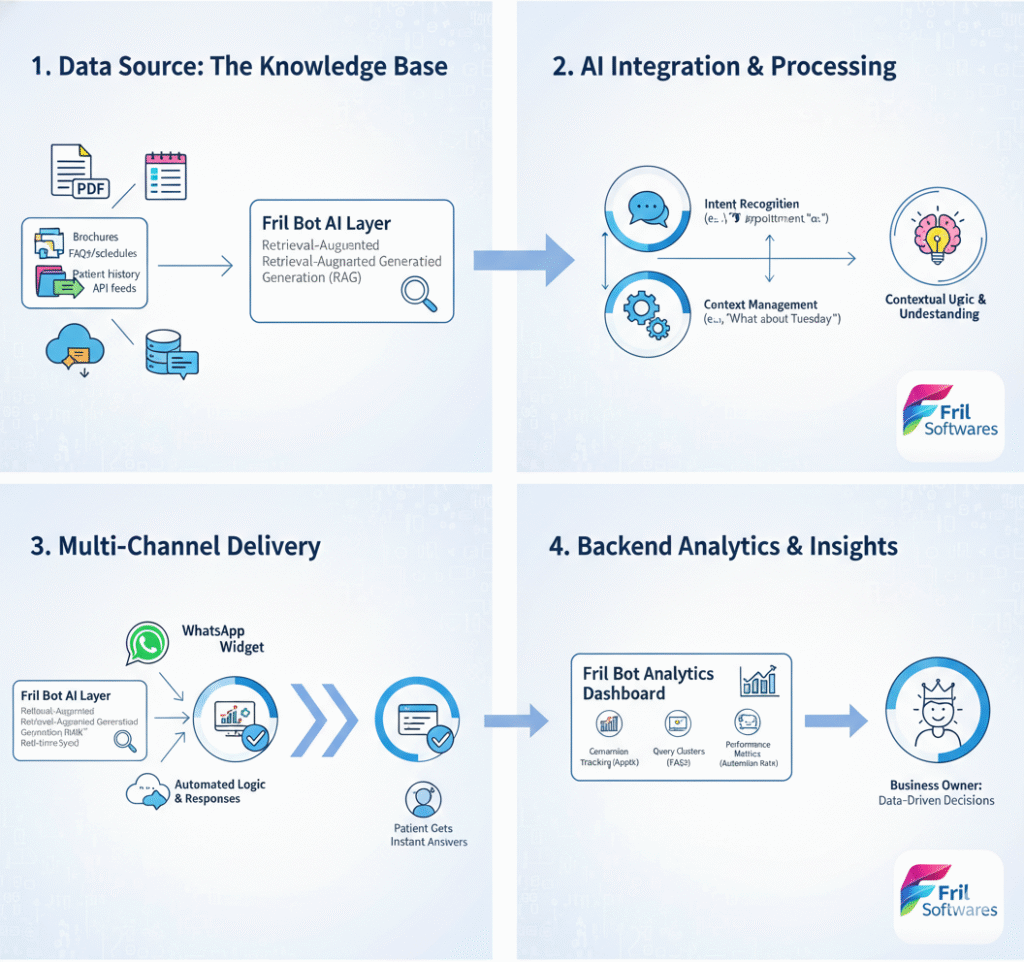
Data Source
The Knowledge Base
- PDF Brochures
- FAQ Sheets
- Patient History
AI Integration
Processing & Context
Multi-Channel
Patient Delivery
Instant Patient Answers
Backend Insights
Business Owner Dashboard
- Appt. Tracking
- Query Clusters
- Performance Metrics
How can I use AI to build a WhatsApp chatbot?
Do I need coding skills to build a WhatsApp chatbot?
No, you don't need coding skills. You can create WhatsApp chatbots without any coding knowledge, as well as an AI Agent that can build it for you. If you have any concern Fril Bot is a no-code solution managed by FrilSoftwares. We handle setup, flow design, WhatsApp API integration, and ongoing support.
How do I train my AI chatbot?
Training an AI chatbot involves providing it with relevant data and knowledge sources and refining its responses based on user interactions. We use a method called RAG (Retrieval-Augmented Generation). You provide us with your PDFs, website links, or documents, and we "feed" them into the AI. The bot then answers questions based only on your verified data, preventing it from making up incorrect information.
What’s the easiest way to automate replies on WhatsApp?
The easiest way to automate replies on WhatsApp is with WhatsApp chatbots. WhatsApp chatbots can take on certain user interactions for you. While Fril Bot handles up to 80% of routine inquiries (booking, hours, FAQs), it is designed to assist your team, not just replace them. For complex medical advice or emergencies, the bot seamlessly triggers a Human Hand-off, notifying your staff to take over the chat.
Can I use the same Chatbot on my website and WhatsApp?
Absolutely. Fril Bot is a multi-channel solution. We integrate the same "brain" into your website's chat widget and your WhatsApp number. This ensures that if a patient starts a conversation on your site and moves to WhatsApp, the experience remains consistent.
Do I need a special WhatsApp account to use an AI WhatsApp Bot?
Yes. To automate at scale, you need the WhatsApp Business API. Don't worry—FrilSoftwares handles the entire application and verification process for you, ensuring your business gets the "Official Business Account" status (the Green Tick).
What is the difference between a standard Chatbot and an AI Bot like Fril Bot?
A standard chatbot follows a rigid "decision tree" (Press 1 for X, Press 2 for Y). Fril Bot is an AI Bot powered by Natural Language Processing (NLP). This means it understands full sentences, misspellings, and context, allowing patients to talk to it like a real person.
Is using a WhatsApp Bot secure for medical data?
Yes. WhatsApp provides end-to-end encryption. Furthermore, Fril Bot is built with security-first protocols, ensuring that patient data is handled according to healthcare privacy standards and is only accessible by you on your backend dashboard.
How do I see the results and ROI of my AI Bot?
Every interaction is logged in your Backend Insights Dashboard. You can track:
-
Total Conversations: How many people interacted with the bot.
-
Automation Rate: The percentage of chats resolved without human help.
-
Lead Generation: Details of patients who inquired about services or booked appointments.